LinkedIn Group Member Scraper - Chrome Extension
LinkedIn Group Member Scraper is a Chrome extension that helps you extract publicly available LinkedIn group member information and export the collected data to a CSV file. Instead of manually copying member information from a LinkedIn group, you can use this LinkedIn group scraper to collect available member details directly from the group members page.
The LinkedIn Group Member Extractor is useful for LinkedIn research, lead generation, recruiting, audience research, business intelligence, and organizing group member data. The extension runs directly in Google Chrome and provides a simple Start and Stop workflow for collecting available LinkedIn group member information.
What Is a LinkedIn Group Member Scraper?
A LinkedIn Group Member Scraper is a tool that helps collect available member information from LinkedIn groups and organize the results into a structured dataset. The BhansaliSoft Chrome extension is designed for users who need to research LinkedIn groups without manually copying information from individual member profiles.
After opening a LinkedIn group members page, the extension can scan the available member information and collect supported profile and group fields. Once the scraping process is completed, the results can be downloaded as a CSV file for analysis, organization, or use with compatible spreadsheet and business tools.
LinkedIn Group Member Scraper Features
The extension can extract the following available LinkedIn group member and group information:
- First Name - Member's first name when available.
- Last Name - Member's last name when available.
- Profile ID - LinkedIn profile identifier when available.
- Profile URL - LinkedIn member profile URL.
- Bio - Available profile biography information.
- Profile Picture - Available member profile picture information.
- Group ID - LinkedIn group identifier.
- Group Name - Name of the LinkedIn group.
- Group Image - Available group image information.
- Member Type - Available member type information.
Export LinkedIn Group Members to CSV
After collecting the available group member data, you can use the Download as CSV option to export the results. CSV files can be opened with Microsoft Excel, Google Sheets, and other spreadsheet applications, making it easier to organize and analyze your LinkedIn group member dataset.
Who Can Use a LinkedIn Group Member Extractor?
The LinkedIn Group Member Scraper can be useful for sales professionals, recruiters, marketers, agencies, researchers, entrepreneurs, and business owners who need to research LinkedIn groups and organize publicly available member information.
You can use the extracted data for audience research, professional community analysis, recruitment research, prospect research, market research, and other legitimate business research activities. Always use collected information responsibly and follow LinkedIn's terms, policies, and applicable privacy and data-protection laws.
How to Scrape LinkedIn Group Members
Step 1: Install the Chrome Extension
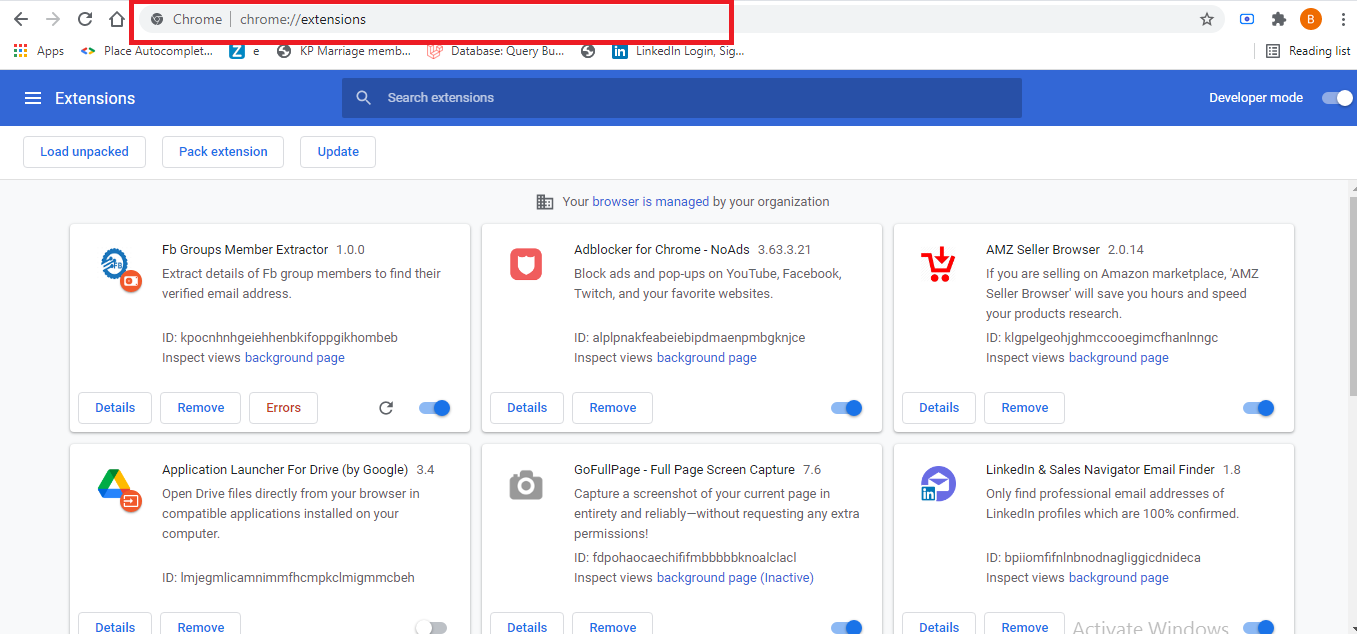
Make sure you are using the latest version of Google Chrome. After purchasing the product, download the main package and unzip the files. Open the Chrome Extension Manager using:
chrome://extensions/
Enable Developer mode, click Load unpacked, and select the software/extension folder from the downloaded package.
Step 2: Register Your License
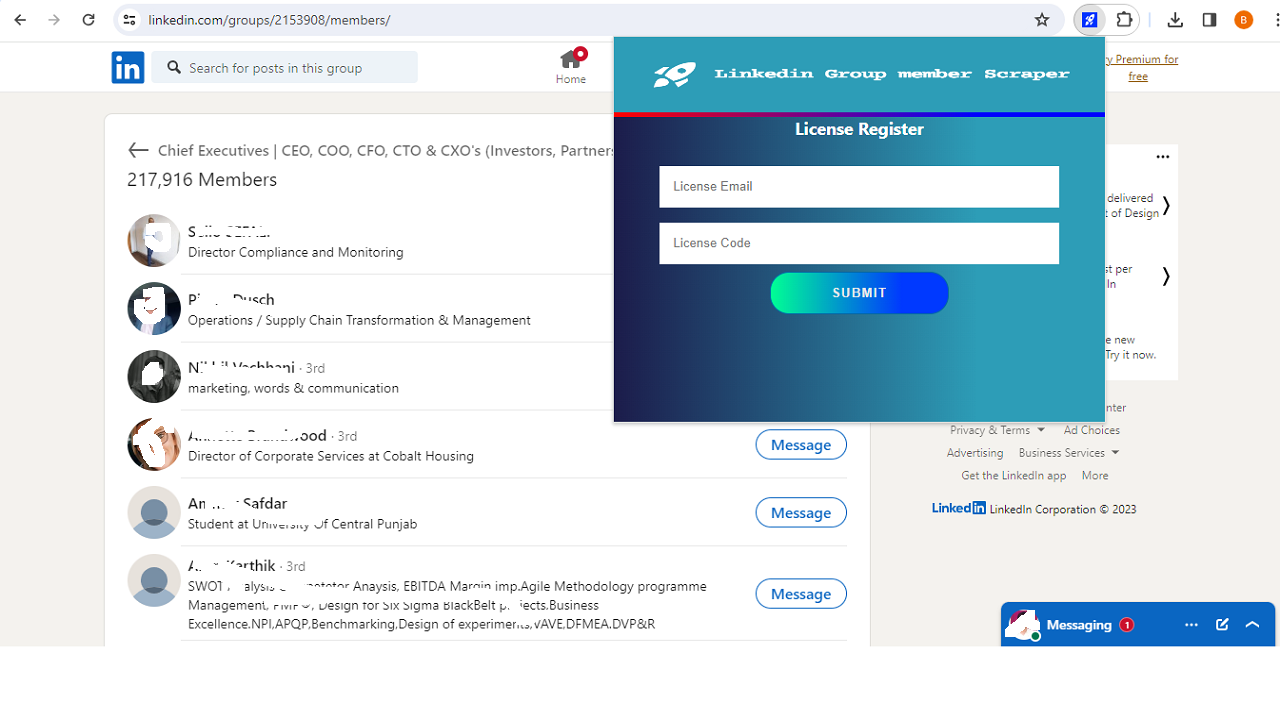
After installing the extension, open LinkedIn Group Members Extractor from the Chrome extensions menu. Enter your purchase code as the license code and provide your email address to register the extension.
- License Code: Your Envato purchase code.
- Email ID: Your email address.
Step 3: Open a LinkedIn Group Members Page
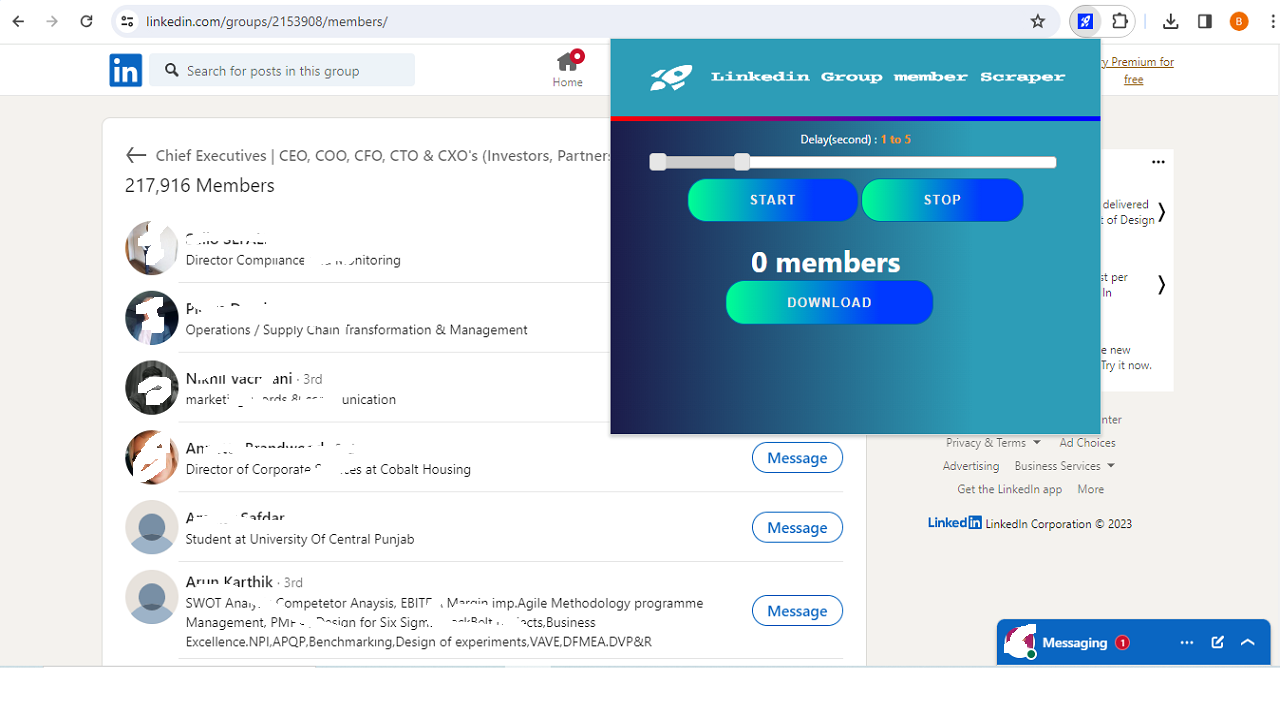
Open the LinkedIn group members page for a group that you have access to. You must be a member of the LinkedIn group to access its member page.
Open the LinkedIn Group Members Extractor extension and click Start Now. The extension will begin collecting the available supported member and group information.
Step 4: Download LinkedIn Group Member Data
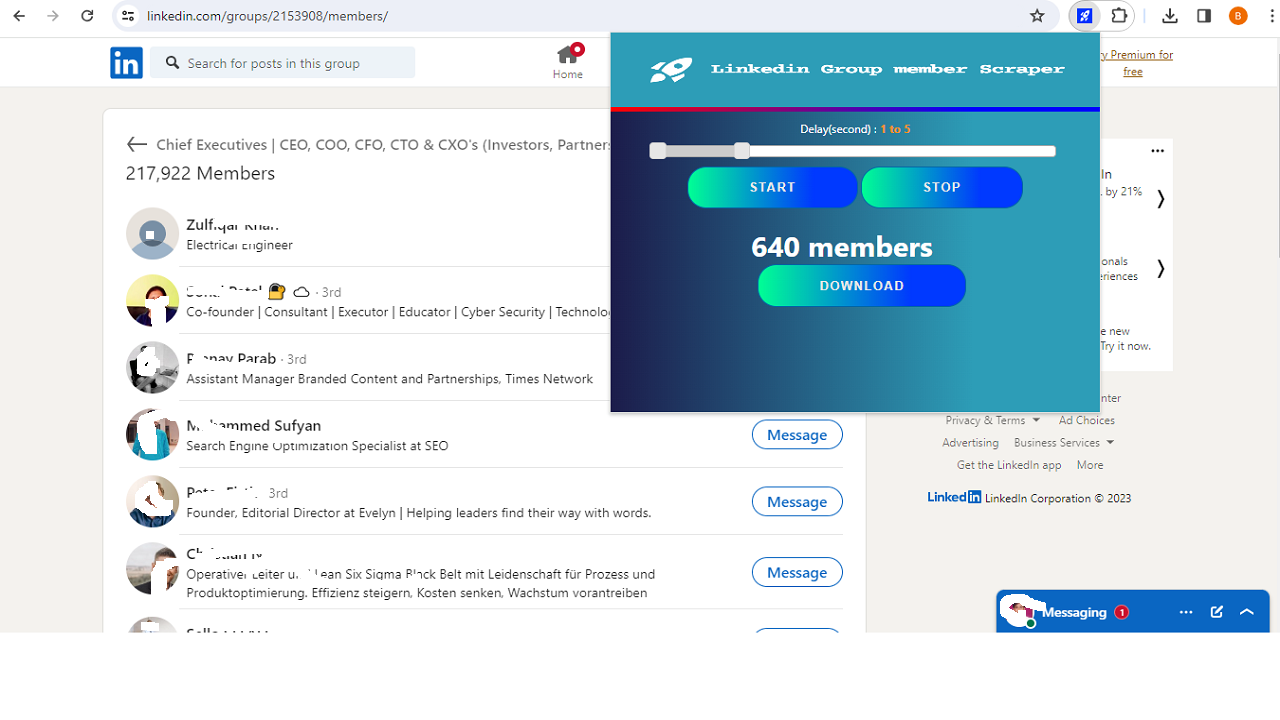
When the scraping process is complete, click Download as CSV to export the collected LinkedIn group member information to a CSV file.
Project Requirements
- Latest version of Google Chrome.
- Access to the LinkedIn group members page you want to research.
- You must be a member of the relevant LinkedIn group to access its members page.
Frequently Asked Questions
What is a LinkedIn Group Member Scraper?
A LinkedIn Group Member Scraper is a tool that helps collect available information from LinkedIn group members and organize the results into a structured dataset. This Chrome extension allows you to export collected information as a CSV file.
What information can the LinkedIn Group Scraper extract?
The extension supports fields including first name, last name, profile ID, profile URL, bio, picture, group ID, group name, group image, and member type when the information is available.
Can I export LinkedIn group members to CSV?
Yes. After collecting the available member information, you can use the Download as CSV option to export the results.
Does the LinkedIn Group Member Scraper work with Chrome?
Yes. The product is designed as a Google Chrome extension and can be installed through Chrome's Extension Manager using the Load unpacked option.
Do I need to join the LinkedIn group?
Yes. You need access to the relevant LinkedIn group members page. The extension does not provide access to private or restricted LinkedIn information.
Installation and License Support
Your purchase code is used as the license code for product registration. If you have a problem with license activation or installation, contact BhansaliSoft support by email.
Purchase code information is available through the Envato Market Help Center.
Support Policy
- 6 months of support is included with the product.
- Support can be renewed by contacting BhansaliSoft.
- Standard support does not include custom development or customization.
- Customization requests may be available for an additional cost.
- One license provides support for one domain.
Contact BhansaliSoft
For installation, license, or product support, contact us by email:
bhansalisoft781986@gmail.com
Use the LinkedIn Group Member Scraper Chrome Extension to organize available LinkedIn group member information and export your results to CSV for research and business data workflows.