Facebook Group Member Scraper & Facebook Message Sender
Facebook Group Member Scraper is an advanced desktop software
designed to extract available member information from Facebook groups and
organize the collected data for further analysis and outreach workflows.
The software also includes Facebook Friend Request Sender and
Facebook Message Sender functionality.
Instead of manually collecting Facebook group member information one by one,
you can enter a Facebook group URL, process the available member information,
export the collected data and use the available outreach features from a
single desktop application.
What Is Facebook Group Member Scraper Software?
Facebook Group Member Scraper is software that helps users
collect available information from Facebook group members. The software
provides an automated workflow for processing Facebook groups and organizing
available member information.
The Facebook Group Scraper can collect available information
such as member names, member IDs, profile links, profile information, profile
images, group IDs and group joining information, depending on the information
available through Facebook.
Facebook Group Member Data You Can Extract
Depending on the information available through Facebook, the software can
collect the following Facebook group member information:
- Member Name
- Member ID
- Facebook Profile Link
- Profile Bio Information
- Profile Image
- Facebook Group ID
- Group Joining Time
This makes the software useful for Facebook group research, audience
analysis, market research, data organization and legitimate business
outreach workflows.
Facebook Group Scraper Features
1. Extract Facebook Group Members
The software can process a Facebook group URL and extract available
Facebook group member information. The automated workflow helps reduce
the manual effort required to open individual profiles and record
member information.
2. Facebook Member Data Export
After collecting available Facebook group member information, you can
export the data into multiple formats:
Exporting Facebook group member data makes it easier to organize,
review and analyze your collected dataset.
3. Facebook Friend Request Sender
The software also provides a Facebook Friend Request Sender
feature. You can use the available member information as part of your
permitted Facebook outreach workflow and send friend requests through
the software.
4. Facebook Message Sender
In addition to Facebook group member extraction, the software supports
Facebook Message Sending. This allows you to communicate
with relevant Facebook members through your Facebook account using the
available messaging functionality.
By combining member extraction, data export, friend requests and
messaging functionality, the software provides an integrated
Facebook Group Scraper and Outreach Tool.
5. Fast Facebook Group Data Processing
The software is designed for fast Facebook group member data processing.
Actual processing speed may vary depending on the Facebook group,
account, network connection, available data and Facebook's current
behavior.
6. Multiple Export Formats
Export your available Facebook group member information into
Excel, CSV or Text format according to your preferred
workflow.
7. Multiple Language Support
The software supports multiple application languages, allowing users
to select their preferred language from the available settings.
Responsible Use:
Facebook automation, data collection, friend requests and messaging
should be used responsibly and in accordance with Facebook's
applicable terms, privacy requirements and relevant laws.
Getting Started With Facebook Group Member Scraper
After registering and activating your software license, start the
Facebook Group Member Scraper application. The software
will display the main interface shown below.
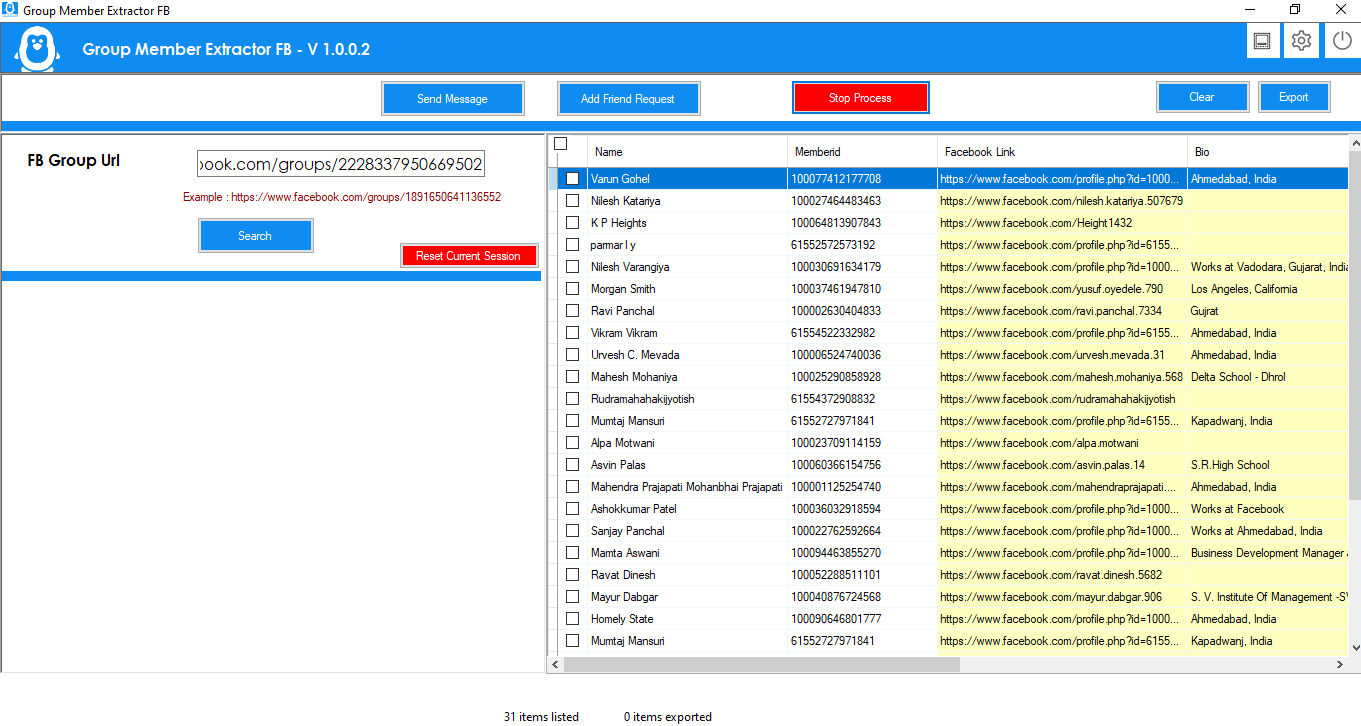 Facebook Group Member Scraper main software screen
Step 1: Enter Facebook Group URL
Enter the Facebook group URL that you want to process into the
software.
Example Facebook Group URL:
https://www.facebook.com/groups/1891650641136552
After entering the Facebook group URL, click the
Search button to start processing the group.
Step 2: Facebook Login
After clicking the Search button, the software will request Facebook
authentication through the browser-based Facebook login interface.
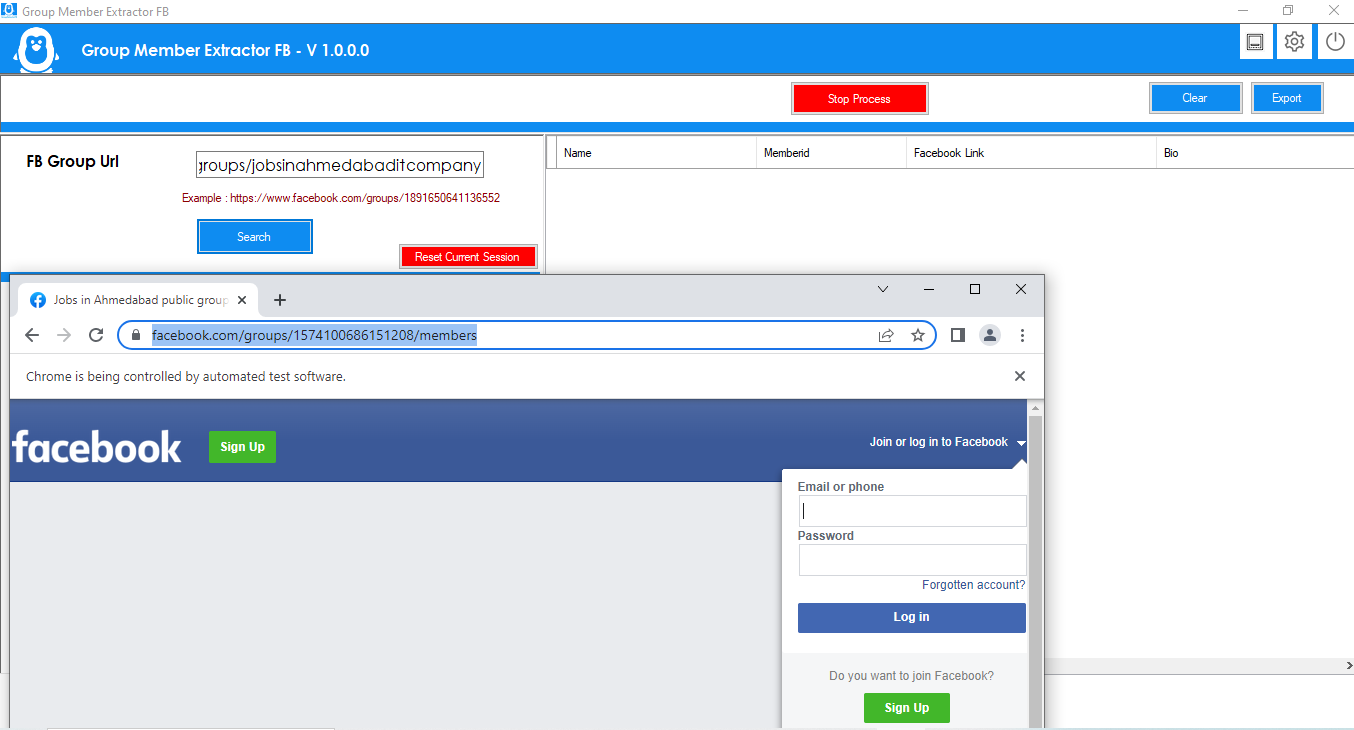 Facebook Group Scraper login screen
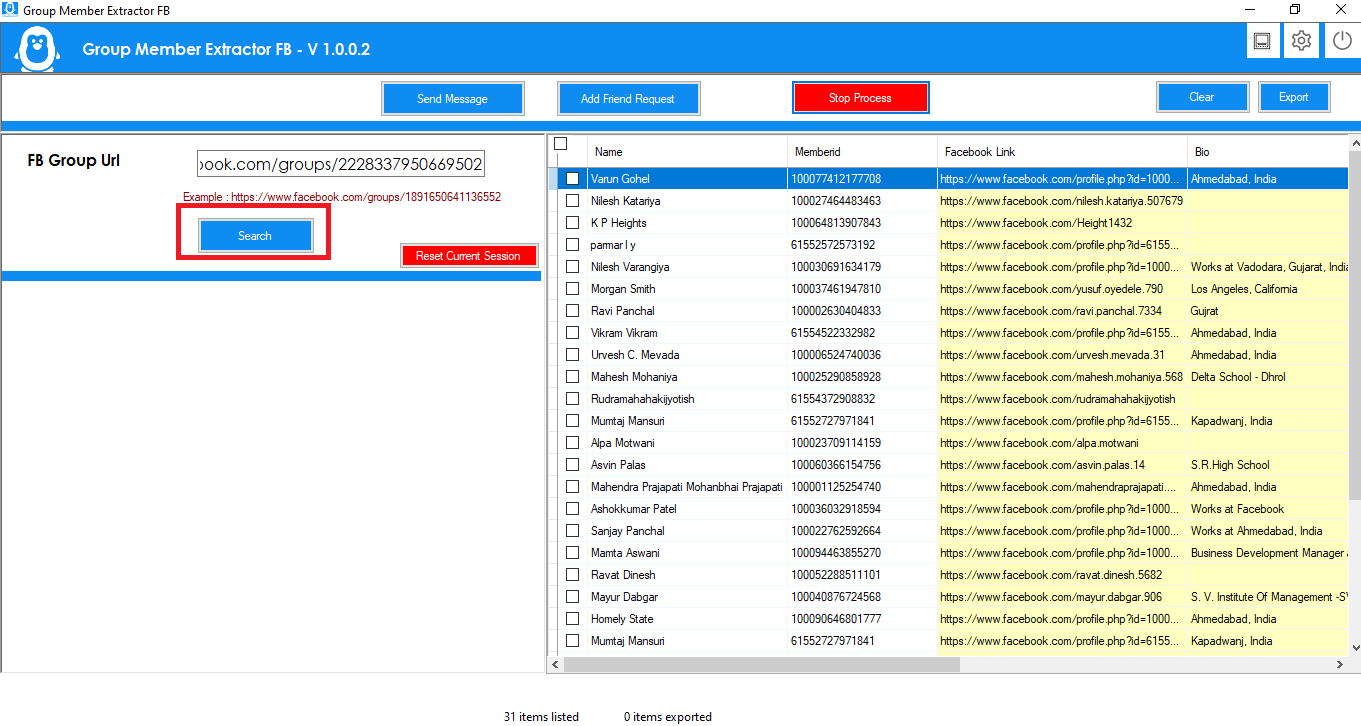 Facebook Group Member Scraper browser login interface
The Facebook login process is handled through the browser functionality
used by the software. According to the product configuration,
Facebook login credentials are not stored on the company's server.
License information is handled separately through the software
licensing system.
Step 3: Extract Facebook Group Members
After authentication, the software processes the selected Facebook
group and extracts available member information.
The Facebook Group Data Scraper can collect available
information such as member names, member IDs, profile links, profile
information, profile images, group IDs and group joining information.
The automated extraction workflow helps reduce the time and manual
effort required to collect Facebook group member information.
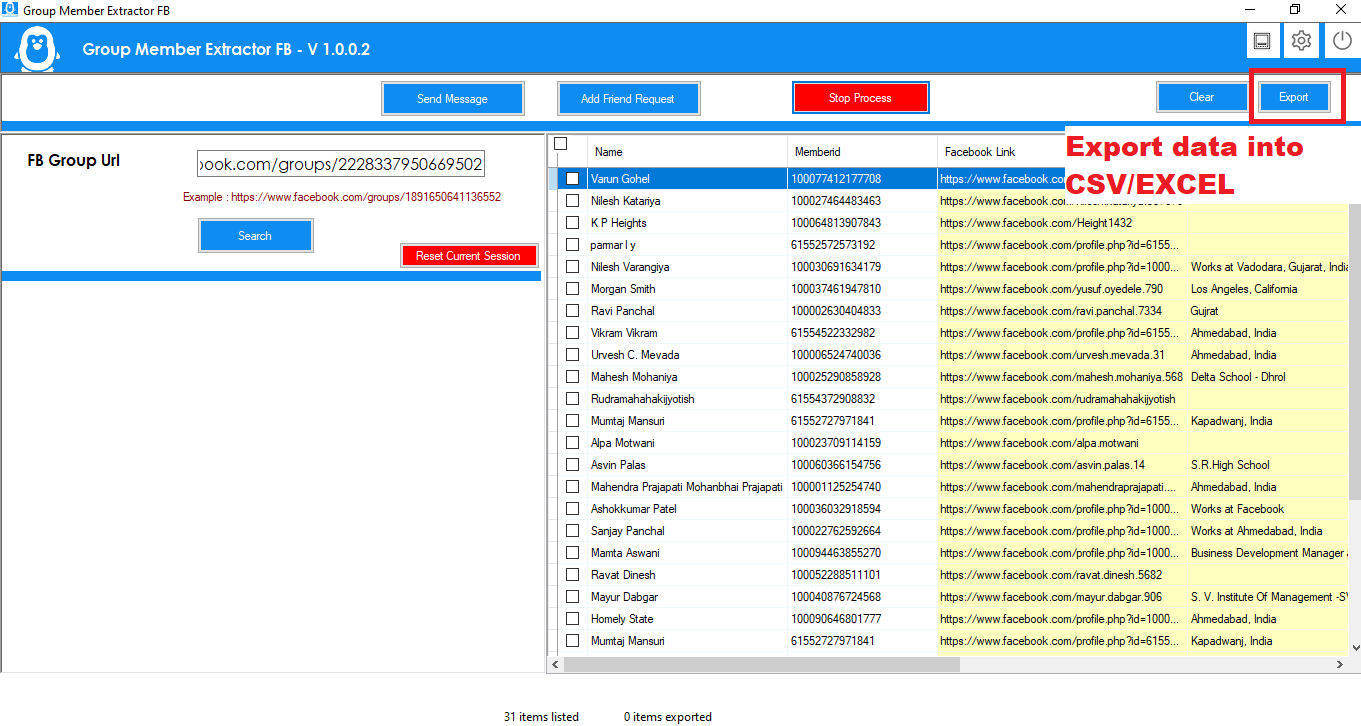 Facebook Group Member Scraper extracted member information
Step 4: Export Facebook Group Member Data
After the extraction process is completed, you can export the
available Facebook group member information into multiple formats.
This provides a convenient way to save, organize and analyze
Facebook group member data.
Facebook Message Sender and Friend Request Tool
The software is not limited to Facebook group data extraction.
It also includes Facebook Message Sender and
Facebook Friend Request Sender functionality.
This allows users to combine Facebook group member data collection
with their permitted outreach workflow from one desktop application.
A typical workflow can be:
- Enter Facebook Group URL
- Process the Facebook Group
- Extract Available Group Members
- Review Member Information
- Export Member Data
- Send Friend Requests where permitted
- Send Messages where permitted
Combining these features can make it easier to manage Facebook group
data collection and outreach activities from a single application.
Facebook Group Scraper Settings
Click the Settings icon on the top bar to configure
the available software options.
 Facebook Group Scraper settings icon
Depending on the software version and configuration, available
settings include:
- VPN-related configuration
- Data export format
- Excel export
- CSV export
- Text export
- Application language
The software supports multiple languages, allowing users to select
their preferred application language.
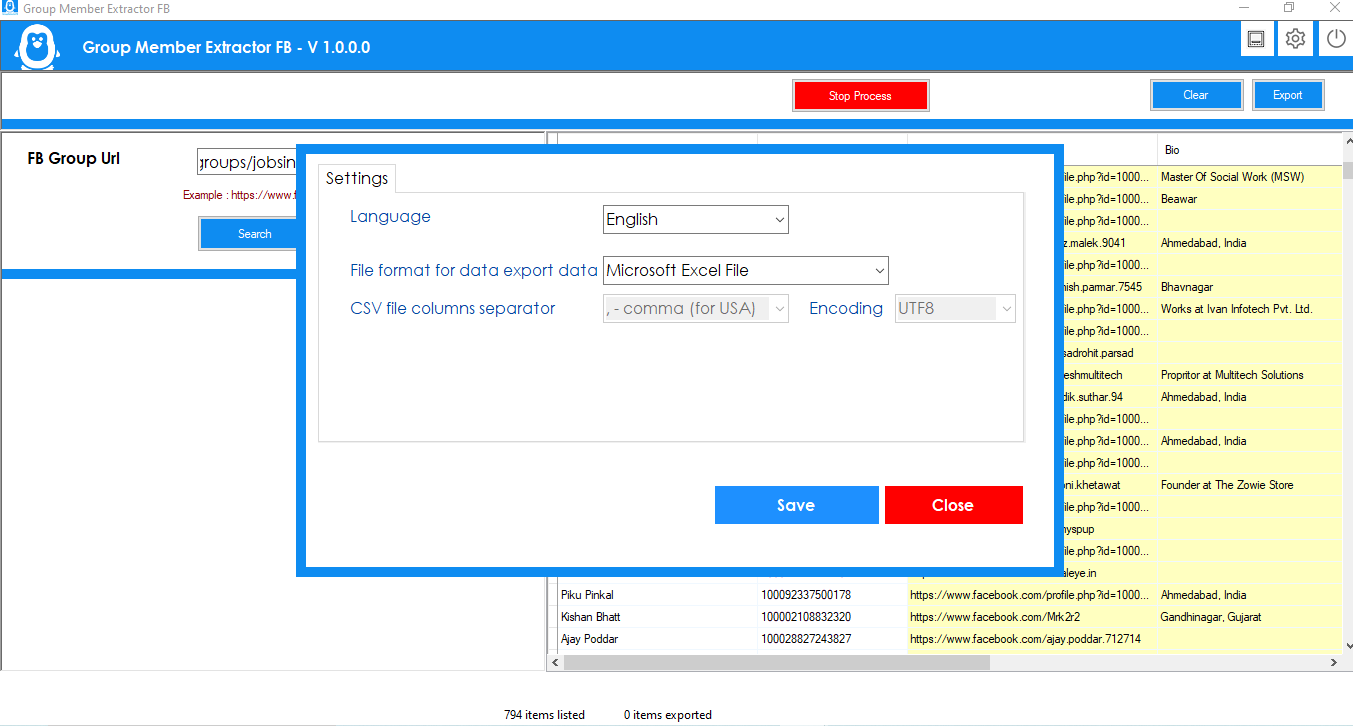 Facebook Group Member Scraper settings and language options
Facebook Group Data Extractor
The Facebook Group Data Extractor provides a desktop
workflow for collecting available information from Facebook groups.
Instead of manually copying member details, users can enter a group
URL, authenticate through the browser-based login process, process
the group and export available information.
The collected information can be exported into Excel, CSV or Text
format for further organization and analysis.
Facebook Group Member Scraper for Business Research
Businesses, marketers and researchers can use a
Facebook Group Member Scraper for legitimate
audience research, community analysis, market research and
organizing publicly available information.
By combining Facebook group member extraction with data export,
friend request and messaging functionality, this software provides
an integrated desktop solution for Facebook data collection and
permitted outreach workflows.
Why Choose Our Facebook Group Scraper?
- Desktop-based Facebook Group Member Scraper
- Facebook Group Member data extraction
- Facebook Member information processing
- Facebook Profile URL collection
- Excel, CSV and Text export
- Facebook Friend Request functionality
- Facebook Message Sender functionality
- Multiple language support
- Configurable software settings
- Integrated extraction and outreach workflow
Frequently Asked Questions
What is a Facebook Group Member Scraper?
A Facebook Group Member Scraper is software designed to process
Facebook groups and collect available member information. The
collected information can be organized and exported for further
analysis.
What data can the Facebook Group Scraper extract?
Depending on the information available through Facebook, the
software can collect member name, member ID, Facebook profile link,
profile bio information, profile image, group ID and group joining
time.
Can I export Facebook group member data?
Yes. The software supports exporting available Facebook group
member information to Excel, CSV and Text formats.
Does the software support Facebook messages?
Yes. The software includes a Facebook Message Sender
feature for messaging members through the available Facebook
workflow.
Does the software support friend requests?
Yes. The software also provides a
Facebook Friend Request Sender feature.
Is Facebook Group Member Scraper desktop software?
Yes. The product is designed as desktop software for Facebook group
member data collection, export and available outreach functionality.
Does the software support multiple languages?
Yes. The application supports multiple languages and provides a
language option through the software settings.
Facebook Group Scraper and Message Sender
If you are looking for a Facebook Group Member Scraper,
Facebook Group Scraper, Facebook Member
Scraper, Facebook Group Data Extractor,
Facebook Friend Request Sender or
Facebook Message Sender, this software combines
these capabilities into one desktop application.
The complete workflow allows you to process Facebook groups, collect
available member information, export data and manage permitted
member outreach from a single software solution.
Responsible Use: Always ensure that your use of
Facebook data collection, friend requests and messaging complies
with Facebook's applicable terms, privacy requirements and
applicable laws.